How SANnav Licensing Works
Through a combination of server unique ID (UID) and transaction key, you can generate a license key to activate the SANnav license.
When you install SANnav on a server or virtual machine (VM), a server unique ID (UID) is generated. You can view this server UID and copy it from the SANnav Licensing page.
When you order a license, an email message along with a transaction key is issued by Broadcom as fulfillment of your license purchase. The transaction key and server UID are used to generate a license key and license serial number from the Broadcom licensing portal.
After you obtain the license key, add it in SANnav, and activate the license.
This flow is illustrated in the following diagram.
Figure 8. Generating a License

Note: Keep a record of the license serial number. You need the license serial number if you contact Support. If you need to recover the license key, such as if you mistakenly delete the license from SANnav or if the SANnav server fails, you can use the license serial number in the Broadcom licensing portal License Query to retrieve the license. The license serial number can also be obtained from the Licensing page of the SANnav user interface.
Rehosting a License
If you want to move SANnav to a different server or VM, you do not need to purchase a new license. But because licenses are locked to the server UID, you do need to obtain a new license key for the new SANnav instance.
Migrating a license from one SANnav instance to another is called rehosting. If you want to move SANnav from the current server or VM to another, you must first release the current license. When you release the license a rehost key is generated. You must provide the rehost key and the new server UID to get a license for the new SANnav instance.
You must also use the rehosting process if the MAC address of server changes for any reason.
The following diagram illustrates the rehosting flow.
Figure 9. Rehosting a License
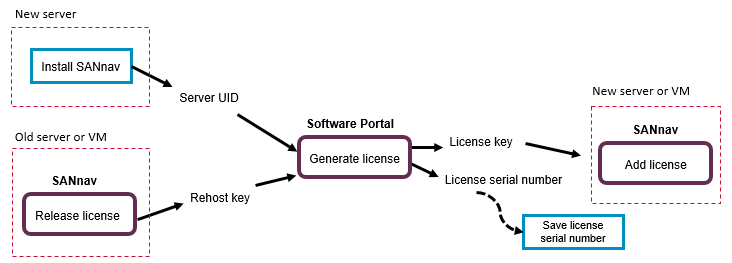
The released license expires on the prior SANnav instance after 30 days from the time of release or on the original expiration date, whichever comes first. This 30-day period allows you to continue using the existing instance while you bring up the SANnav software on a new server or VM and validate whether the new server or VM is working prior to decommissioning the existing SANnav instance.
Parent topic