Widgets for Dashboards and Reports
SANnav provides pre-configured widgets, which you can use in tailored dashboards and reports. For example, one of your first tasks might be to tailor a Dashboard view with one or more pre-configured widgets so that you can monitor switch and port status or track error and performance statistics.
When creating a dashboard or report, you can choose from two classes of widgets: Status and Performance. The Performance class comprises Custom and Distribution widgets, which are described as follows:
• Custom widget.
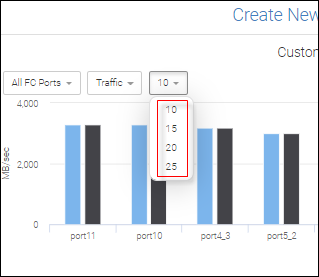
You can select the entity type (port type, tunnel, or circuit), performance measure, and the count of Top N items at run time. (For Top N widgets, N represents the text box, where valid values are 10, 15, 20, and 25.) Custom widgets are of two types: product and port/extension tunnel/extension circuit.
• Distribution widget.
With this widget entities like port and switches are distributed among a maximum of five percentage buckets within which selected measures range from 0 to 100%. This widget answers a question like ports utilization over the last hour by showing port count for each percentage bucket.
Custom Top N Port allows you to select the performance/error metrics for the selected port type.
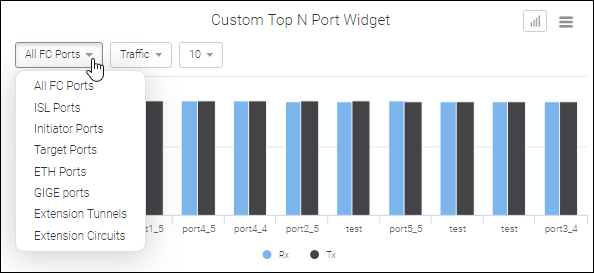
The supported Min and Max values are shown below.
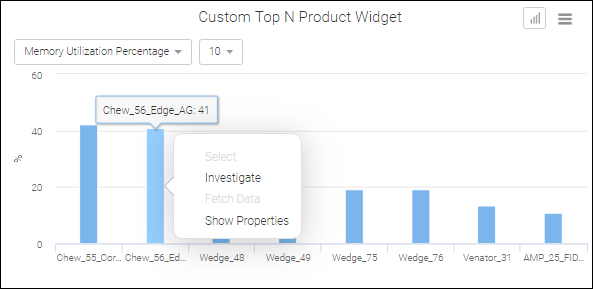
Custom Top N Product allows you to select the performance metric (CPU or memory utilization) for the SAN environment.

From within a custom widget, you can launch the Investigate option to perform detailed performance monitoring.
Product Distribution allows you to select either CPU or Memory Utilization from one to five distribution buckets to capture the number of products. For each bucket the maximum % distribution is 100%

Port Distribution allows you to select a port and error type from one to five distribution buckets to capture the number of ports. As shown in the following screenshot, this widget has been modified to display only four distribution bands.
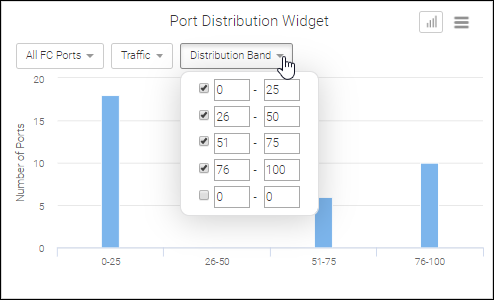
Note: By default, all widgets limit the number of items displayed to 10. However, custom widgets allow you to select a maximum of 25 items.
Some widgets are exclusive to Extension Tunnels and Circuits. Top Tunnel Utilization and Top Tunnel Dropped Packets comprise the Extension Tunnel widget set, whereas the set of Extension Circuit widgets include Top Circuit Utilization, FC Utilization, IP Extension Utilization, Jitter, and RTT.
Parent topic